Apple Music has gradually expanded beyond Apple devices, and Roku is now part of that ecosystem. If you mainly use a Roku TV or streaming stick at home, you may be wondering whether Apple Music works smoothly on Roku in 2026—and what your options are when Wi-Fi isn’t available. Learn more about using Apple Music on non-Apple devices for TVs, consoles, cars, and other platforms.
This guide explains everything you need to know about Apple Music on Roku, including official support, device compatibility, AirPlay alternatives, and practical offline listening solutions.
Is Apple Music Available on Roku in 2026?
Yes. Apple Music is officially supported on Roku and remains available in 2026 through the Apple Music app in the Roku Channel Store.
Roku’s official support & current status
Apple launched the Apple Music app for Roku in late 2021, and it continues to receive maintenance updates. Users can stream music directly on Roku TVs and Roku streaming devices without relying on AirPlay.
Which Roku device models support Apple Music
Apple Music works on most modern Roku devices, including:
- Roku TV (TCL, Hisense, Sharp, etc.)
- Roku Express / Express 4K+
- Roku Streaming Stick / Stick 4K
- Roku Ultra
Older models running outdated Roku OS versions may not be supported.
Is an Apple Music subscription required?
Yes. You need an active Apple Music subscription to stream music on Roku. There is no free, ad-supported Apple Music tier on Roku.
Feature support on Roku
On Roku, Apple Music supports:
- Full playlist and library synchronization
- Browse, search, and play albums
- Lyrics display (for supported tracks)
- Dolby Atmos playback (device & TV dependent)
Some advanced Apple-only features (like Sing karaoke controls) may be limited.
Requirements to Use Apple Music on Roku
Before installing the app, make sure you meet the following requirements:
- Apple ID linked to an active Apple Music subscription
- Roku OS 10.0 or later
- Stable Wi-Fi connection for streaming
For iPhone/iPad users: AirPlay enabled Roku can be used as an alternative method
How to Get Apple Music on Roku (Official App)
Installing Apple Music on Roku only takes a few minutes.
Step 1: Turn on your Roku device and go to Streaming Channels
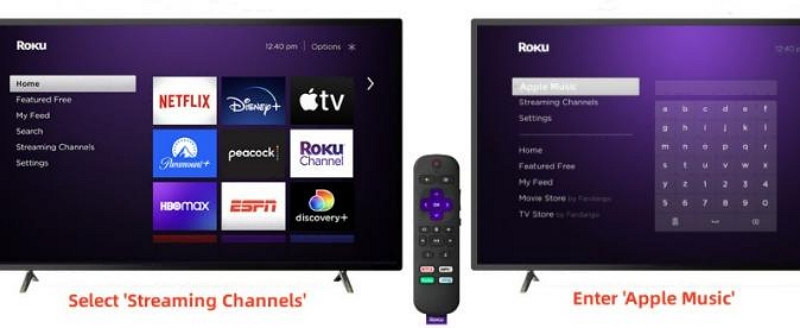
Step 2: Open Channel Store and search for Apple Music
Step 3: Select Add Channel
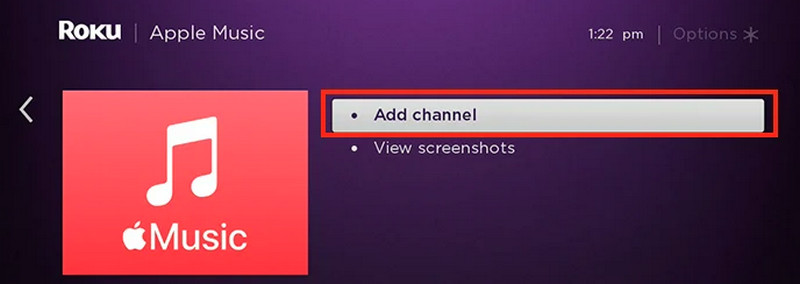
Step 4: Launch Apple Music from your Roku home screen
Step 5: Sign in using your Apple ID (or activate via code on Apple’s website)
Once signed in, your playlists and library will sync automatically.
How to AirPlay Apple Music to Roku
If you prefer not to install the Apple Music app, AirPlay is a flexible alternative.
Enable AirPlay on Roku
First, you have to enable AirPlay on Roku. Here’s how to do so:
Step 1: Go to Settings > Apple AirPlay and HomeKit
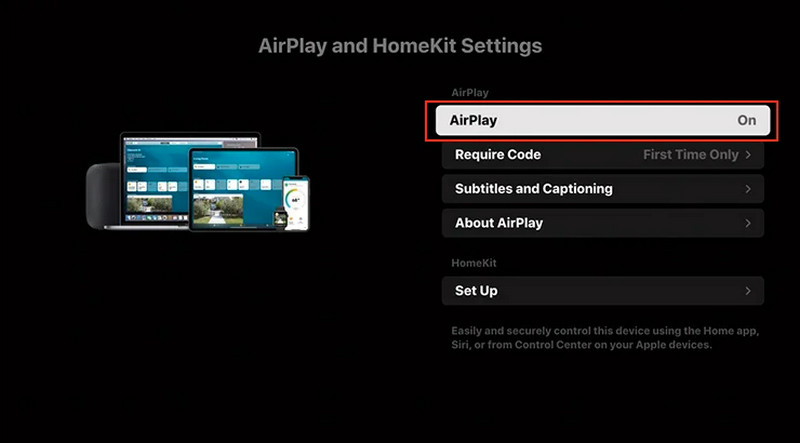
Step 2: Turn AirPlay ON
Step 3: Set permissions to “Allow from same network”
AirPlay Apple Music from iPhone / iPad / Mac
Now that AirPlay is enabled on your Roku device, you just need to tweak a few settings on your iPhone.
Step 1: Open the control center and play some music.
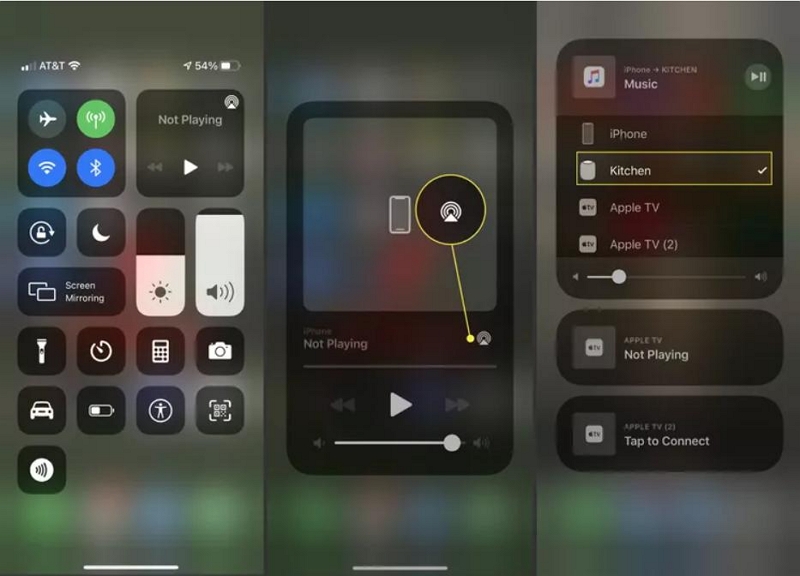
Step 2: Tap the AirPlay icon (broadcast icon) and select your Roku device. Once the connection has been established, your Apple Music songs can be played on Roku.
Note: This method works well for quick playback but still requires Wi-Fi.
Ways to Listen to Apple Music on Roku Without Wifi
If you want to listen without an internet connection, Roku itself doesn’t support offline Apple Music playback. However, there is a practical workaround.
Using StreamFox for Music (offline solution)
StreamFox for Music allows users to save Apple Music tracks as standard audio files for personal use, making them playable through local media servers or USB playback on Roku-compatible apps.
Note: This approach is intended for personal offline listening and device compatibility, not redistribution.
- Converts Apple Music to MP3, AAC, or FLAC
- Preserves ID3 tags and playlist structure
- Works on Windows and macOS
- Enables playback via Plex, Roku Media Player, or local servers
FAQs
1. Can You Download Apple Music on Roku?
Unfortunately, you cannot download songs on Roku while using the Apple Music app. You can only stream audio online. The alternative solution is to download the songs to your computer, upload them to Plex or a local server, and then play on Roku.
2. How to claim Roku Apple Music 3-month free trial?
Some Roku devices offer promotional Apple Music trials. Check:
- Roku Home > Featured
- Apple Music app > Subscription offers
Availability varies by region and device.
3. Why is Apple Music not working on my Roku TV?
Common causes include:
- Outdated Roku OS
- Network issues
- Apple Music service outages
Updating Roku and re-signing into Apple Music usually resolves it.
4. Does Apple Music on Roku show synced playlists from iPhone?
Yes, Apple Music on Roku shows playlists from your iPhone, provided sync library has been turned on in Settings. If it isn’t, then you will not be able to see the playlists you have created on your phone or other devices.
5. Can I AirPlay Apple Music to Roku without installing the app?
Yes, you can AirPlay Apple Music to Roku without installing the app. However, you must enable the AirPlay setting on Roku and should connect to the same network to do so.
Conclusion
In 2026, Apple Music works reliably on Roku, whether you choose the official app or AirPlay. For everyday streaming, the native app offers the best experience. If offline playback matters to you, tools like StreamFox for Music provide a flexible way to enjoy your music library across Roku devices—without relying on Wi-Fi.